
A feature that was introduced in Android 2.1 is live wallpapers, and they debuted on the Nexus One back in early January 2010. Live wallpapers are basically animated, interactive homescreen backgrounds that can behave differently depending on the time of the day, where you are, Internet updates, and how you move and touch your device. One can think of them as tiny applications that run in the background, and they have access to all the facilities of the Android platform.
If you know of any cool free live wallpapers that aren’t on this list, please feel free to leave a comment. Figuring out the top live wallpapers was comparatively easy, but it was very difficult to decide which wallpaper was better than the other – so they are in no particular order. Clicking on a thumbnail will bring up a full screenshot, when available.
Top Free Android Live Wallpapers


2011-02-06. Added Thunderstorm, Ascension Lite, Time Date Contrast and MultiPicture.
2010-11-24. Added three retro live wallpapers from The Astonishing Tribe to the Geek Chic section.
2010-11-20. Added Doom and Tetris to the Nerdy category. For more live wallpapers, you can check out AndroidAppolo.com that also lists all the top Android apps.
2010-09-17. Due to the extent of this guide, the live wallpapers have been categorized so they’re easier to overlook. A wallpaper can naturally belong in more than one category, but I’ve tried to put each live wallpaper in the category that best represents it. The list has also been updated with a lot of new cool, quality live wallpapers – all free, of course.
2010-08-31. The live wallpaper Shake Them All! is back in business: http://www.shake-them-all.net/.
2010-08-25. Checked every single live wallpaper in the guide to make sure they’re still available in the Market. Starfield is still there, but some people are unable to find it. Shake Them All! has been removed, as well as Mario and NexusMod (replaced it with Nexus Revamped).
2010-07-21. Added the Mario Live Wallpaper.
2010-05-24. Added Fireworks, Substrate, Logcat, MS Zombie, Shake Them All! and Flying Androids.
 Fast Paced Eye Candy
 Bobs may not appeal to everyone, but of the live wallpapers that show animations moving across the screen, this is one of my favorites. I like how the color of the animation changes, and how it slows down, speeds up and twirls. The developer calls it “yet another nostalgic 20th century old school demo effect”, reminiscent of those that could bee seen on the Amiga back in the day.
 Zoomfield shows flying objects coming towards you, but unlike many of the other live wallpapers with similarly styled animations, Zoomfield is rather soothing.
 Mystify displays dancing lines that changes color and twists across the screen against a black background. It’s clean and not too distracting.
 This live wallpaper shows slowly moving bézier curves, inspired by the PS3 homescreen. You can customize the look of it, and the live wallpaper has seven different color themes. I enjoy Bezier, because it’s not distracting, it’s clean, slick and it makes the homescreen a bit more fun to look at.
Stonerview is a psychedelic live wallpaper that presumably got its name from certain psychoactive stimulants, and if Particle Storm later on in the guide is similar to old Winamp visualizations, this one is almost the spitting image of them. The developer’s description says “this is an amazing 3D live wallpaper. See the shapes swirl and change their color”, and I more or less concur.
This is another live wallpaper full of eye candy, reminiscent of the visualizations of Winamp (the classic MP3 player for Windows). From the Market description: “glowing particles swirl around the local magnetic field, drop due to gravity and respond to your touch. Rendered in OpenGL for maximum 3D effect.”

I was pretty impressed when I first discovered Quads: the PS3 inspired effect it provides is really cool, varied and nice looking, and the LW is very customizable. Check out the video below to see what it looks like.
 This is a live wallpaper that shoots off fireworks in all sorts of colors, and you can tap on the screen to launch a new firework. Fireworks has lots of settings, and you can make it look quite good, but I would have enjoyed this live wallpaper more if the animations were a bit more realistic.
The iconic screen of seemingly random green numbers and characters of the Matrix movies has understandably been a popular topic for Android live wallpapers. Trouble is, most of them have been way too busy. Digital Wall Free is a Matrix themed live wallpaper that luckily is more mellow than the rest, and thus more useful and less stressful.
Subtle & Serene
 This live wallpaper keeps it simple by just showing a ridge with trees silhouetted against a sunset, while clouds gently move across the skyline. The image that is used provides a good contrast to all the widgets and shortcuts on your homescreen, so it’s not in the way. It would be nice with some options, though.

 If PongClock is the highest rated live wallpaper on this list, Earth is definitely the most popular, and it has a high rating as well (4.31). As the name implies, Earth shows our world as seen from space. The globe rotates, and there are plenty of ways to customize the animation. You can change the background, add a starfield, change the speed and rotation, the size of the globe, choose between many different maps, add an orbiting moon, et cetera. I can see why Earth is so popular.
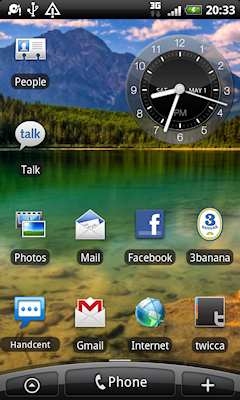 Live Waterpaper uses OpenGL to create a watery effect, and when you tap on the screen, you manipulate the water’s surface. This is currently my favorite live wallpaper (I think), mainly because it’s subtle and peaceful, but it still has a nice and very tangible effect, and since you can use it with the background image(s) of your choice, you can avoid all contrast issues. It’s like a regular homescreen wallpaper, but with a bit of oomph to it – the best of two worlds.
 I had heard a lot of good things about Starfield, and I must admit that I initially was a bit disappointed when I first tried it. My main objection was that it seemed too distracting – a bit stressful, even. But after I slightly decreased the number of stars, the speed and activated the Background option, I really enjoyed having stars coming towards me. I think Starfield is clean, stylish and has a nerdy cool to it. The live wallpaper reminds me of Star Wars, and that is always a good thing (except for the turkey Phantom Menace, of course). You can even double-tap on your screen to engage the warp engines! There’s a similar live wallpaper called 3D Galaxy, but I prefer this one. Update: Some people can currently not find this live wallpaper on the Market, but I am still able to download it.
 This live wallpaper shows a boat on a billowy ocean, and since Wave is connected to your phone’s accelerometer, tilting your device will move the boat.
 Plasma is customizable live wallpaper that generates flowing, psychedelic colors on your homescreen. It comes with an effect builder and a series of presets. I like when live wallpapers aren’t in your face, and Plasma is classy.
 Galactic Core is similar to the default Galaxy live wallpaper, and they both share a serene quality. Galactic Core features a rotating spiral galaxy, is unobtrusive and doesn’t distract.
Four Seasons -Spring- was an instant favorite of mine, not least because I am a big fan of the Japanese artist Katsushika Hokusai’s (1760-1849) paintings upon which this live wallpaper is based. But also since it’s soothing, very peaceful, and dare I say artistic? It shows Mt. Fuji through cherry blossoms, all while cherry petals gently fall to the ground. The look it provides may not appeal to everyone, but for those who enjoy the work of Hokusai, this live wallpaper is a must.
This LW is another new favorite of mine. It gathers the cover art for the albums in your music collection and turns them into an ever-changing collage for your homescreen. There are plenty of customization options, and all music fans ought to give it a try. One drawback, however, is that Living Music slows down homescreen scrolling – at least in LauncherPro.

 PopSquares is a basic, calming and customizable live wallpaper, and consists of a matrix of color-cycling rectangles.
 Even though I like the idea of having fish swimming around on my homescreens, I think Aquarium has lots of room for improvement. It shows tropical fish in a fish tank, and the animations are alright, but I think the general look is a bit too childish.
This is another live wallpaper that simulates an aquarium. It’s actually quite nice looking with little bubbles of air floating up and reflections from the sun shining down. The full version lets you choose from 14 types of fish, and you can feed the fish, and fish may “grow and have baby” (sounds a bit scary, actually). This is a 2-day trial, and after that the features will be limited, but it’s good and functioning even then.

As the name suggest, aniPet Koi is another fish live wallpaper from the same developer that released aniPet Aquarium above. This one shows a koi swimming in a pond with lily pads, and it’s also peaceful and serene. This is a trial version that’s fully-featured for two days.

 I initially made the mistake of dismissing this live wallpaper, since I didn’t give it enough time to do its thing, and it looks kind of modest at first. It’s also not a single live wallpaper, but several – all with different effects. The developer describes them with these words: “A set of live wallpapers, each displaying a slowly changing pattern which gradually evolves in your home screen. These subtle animations save battery power and keep your home screen responsive.” I could add “artistic” to that description. I think Substrate is one of the better and most original live wallpapers out there at the moment.
 The developer describes his creation with the words “Bouncing lines, old school live wallpaper. A nostalgic trip with the old screen saver.” Depending on how you configure Lines, it can almost have a ghostly effect. It’s a good choice for those who like plain black backgrounds, but want to add a twist to it.
 LivingColors will react to a single tap by producing a randomly colored expanding circle.

Nerdy Geek Chic
Doom was the first video game that really blew my mind, and I played id Software’s classic FPS and its sequel Hell on Earth for countless of hours on my AMD 486 computer at the time. This live wallpaper shows the space marine protagonist of Doom battling it out with all the familiar monsters, such as imps, shotgun guys, demons, cyberdemons, lost souls, and barons of hell. All those who have played the game will likely get nostalgic watching the marine fight the forces of hell. The live wallpaper is interactive as well, since it lets you spawn enemies and drop weapons and med packs for the hero by touching the screen. Perhaps not a live wallpaper I would use on a daily basis, but it’s fun nonetheless.
In November 2010, Swedish technology and design company The Astonishing Tribe (TAT) dropped three retro-style live wallpapers in the Market. TAT is actually responsible for some of the most iconic Android features, such as the slide-down notification bar, the analog clock and the unlock screen. Check out the official promo video below to get an idea of what the live wallpapers look like, and click the links below to read more about them.
 This is a live wallpaper for all the Tetris fanatics out there, but those who aren’t fans of the game will likely not enjoy it. Tetris shows, well, a game of Tetris, with colored blocks gently falling. There are ways of customizing the live wallpaper, such as changing the colors and the AI.
I kept a close eye on VR Tunnel even before it was made available on the Android Market and still was being beta tested at the xda-developers, and wrote about it on Androinica as soon as it got a public release. It provides a “motion sensitive holographic 3D effect” and is quite geek chic. VR Tunnel has a retro, almost 80s vibe and feel to it, and is reminiscent of early virtual reality (hence the name). It’s not be the best looking live wallpaper on this list, nor the coolest or most impressive, but VR Tunnel has an unusual quality to it that’s hard to define.
 This is a modification of the Nexus live wallpaper that comes preloaded with Android 2.1, but unlike the original, Nexus Revamped has lots of options. I like how it’s very geek chic Update: The video below is showing the NexusMod live wallpaper that no longer is available, but Nexus Revamped looks almost exactly the same.
 Of all the live wallpapers on this list, I think PongClock presently has the highest rating on the Market: 4.51 / 5 (based on only 51 ratings, though). It shows a game of Pong on your homescreen, as well as the current time, and it has a true retro feel. PongClock comes with many settings, and even a multitouch game mode! Check it out.
 This is a live wallpaper for all the fellow nerds out there: it displays the Android activity log on your screen. You can select which font to use, and Logcat has an “old phosphor effect” option. There’s a full version as well, which is more customizable. I think Logcat is a bit too distracting, and it makes it rather hard at times to see the shortcuts on your homescreen, but it’s still a fun live wallpaper that deserves to be on this list.
 This live wallpaper shows zombies walking across your screen, and if you tap on them – an airplane comes flying in and blasts those bad boys into oblivion. It’s apparently a fan work for Metal Slug (a series of video games that made its debut on the Neo-Geo back in 1996).
 Shake Them All! is a very popular live wallpaper that displays Androids falling down your screen, using a realistic physics engine and your phone’s accelerometer. The falling Androids apparently react to gravity (I guess he’s not talking about the same gravity that keeps us on the ground), touching, shaking your phone and even light and sound.
 While we’re on the topic of falling Androids, one cannot fail to mention the Flying Androids of this live wallpaper. It displays Androids in various sizes and at different distances flying across your screen. Some of them are apparently into extreme sports, as they use skateboards as their preferred method of transportation…
 The Mario Live Wallpaper is a must for all fans of the world famous video-game plumber protagonist. It shows Mario running through randomly-generated levels with various backgrounds such as underground, outside and castle. The live wallpaper has several settings for look and performance, and you can customize it quite a bit. I wouldn’t use Mario as my daily wallpaper, but it’s definitely fun and entertaining. Update: This live wallpaper is unfortunately no longer available in the Market, but it can be downloaded from the xda-developers instead.
Do you know of any more interesting live wallpapers that can be added to the list? Let me know and I’ll add it to the collection.


 Loading ...


Pingback: Live Wallpaper Android Xda | Wallpapers
Pingback: Best Live Wallpaper Android - How to Make Android Apps for Smartphones
Pingback: Best Live Wallpaper For Android - How to Make Android Apps for Smartphones